Use this file to discover all available pages before exploring further.
This guide takes you through building your first AI agent with Restate and popular AI SDKs.We will run a simple weather agent that can answer questions about the weather using durable execution to ensure reliability.Select your AI SDK:
export OPENAI_API_KEY=your_openai_api_key_herenpm run dev
The weather agent is now listening on port 9080.
4
Register the service
Tell Restate where the service is running (http://localhost:9080), so Restate can discover and register the services and handlers behind this endpoint.
You can do this via the UI (http://localhost:9070) or via:
❯ SERVICES THAT WILL BE ADDED:- agentType: ServiceHANDLER INPUT OUTPUTrun value of content-type 'application/json' value of content-type 'application/json'✔ Are you sure you want to apply those changes? · yes✅ DEPLOYMENT:SERVICE REVagent 1
If you run Restate with Docker, register http://host.docker.internal:9080 instead of http://localhost:9080.
Restate Cloud
When using Restate Cloud, your service must be accessible over the public internet so Restate can invoke it.
If you want to develop with a local service, you can expose it using our tunnel feature.
5
Send weather requests to the AI Agent
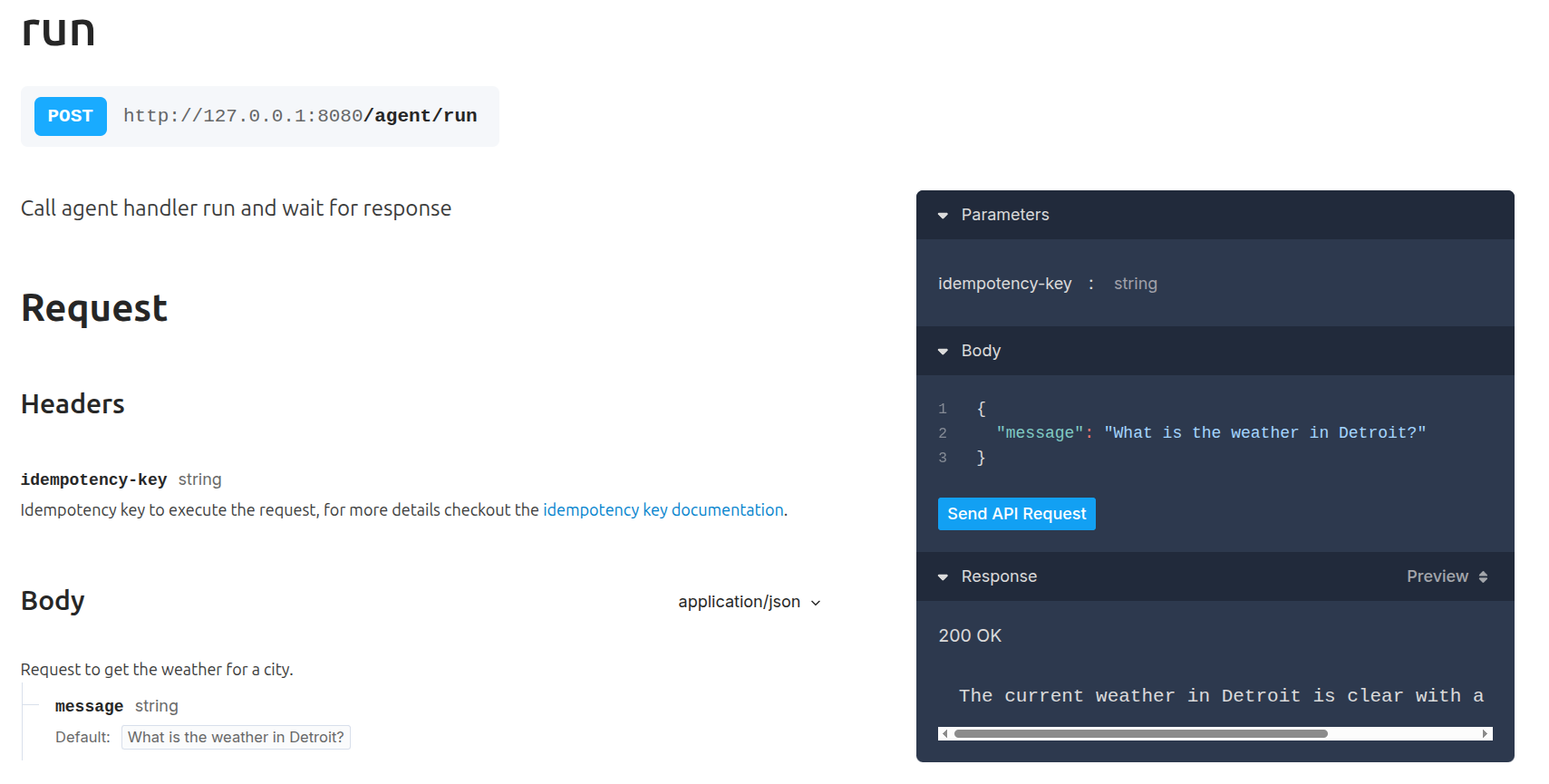
Invoke the agent via the Restate UI playground: go to http://localhost:9070, click on your service and then on playground.
Or invoke via curl:
curl localhost:8080/agent/run --json '"What is the weather in Detroit?"'
Output: The weather in Detroit is currently 17°C with misty conditions..
6
Congratulations, you just ran a Durable AI Agent!
The agent you just invoked uses Durable Execution to make agents resilient to failures. Restate persisted all LLM calls and tool execution steps, so if anything fails, the agent can resume exactly where it left off.We did this by using Restate’s durableCalls middleware to persist LLM responses and using Restate Context actions (e.g. ctx.run) to make the tool executions resilient:
async function weatherAgent(restate: restate.Context, prompt: string) { // The durableCalls middleware persists each LLM response in Restate, // so they can be restored on retries without re-calling the LLM const model = wrapLanguageModel({ model: openai("gpt-4o"), middleware: durableCalls(restate, { maxRetryAttempts: 3 }), }); const { text } = await generateText({ model, system: "You are a helpful agent that provides weather updates.", prompt, tools: { getWeather: tool({ description: "Get the current weather for a given city.", inputSchema: z.object({ city: z.string() }), execute: async ({ city }) => { // call tool wrapped as Restate durable step return await restate.run("get weather", () => fetchWeather(city)); }, }), }, stopWhen: [stepCountIs(5)], providerOptions: { openai: { parallelToolCalls: false } }, }); return text;}// create a Restate Service as the callable entrypoint// for our durable agent functionconst agent = restate.service({ name: "agent", handlers: { run: async (ctx: restate.Context, prompt: string) => { return weatherAgent(ctx, prompt); }, },});// Serve the entry-point via an HTTP/2 serverrestate.serve({ services: [agent],});
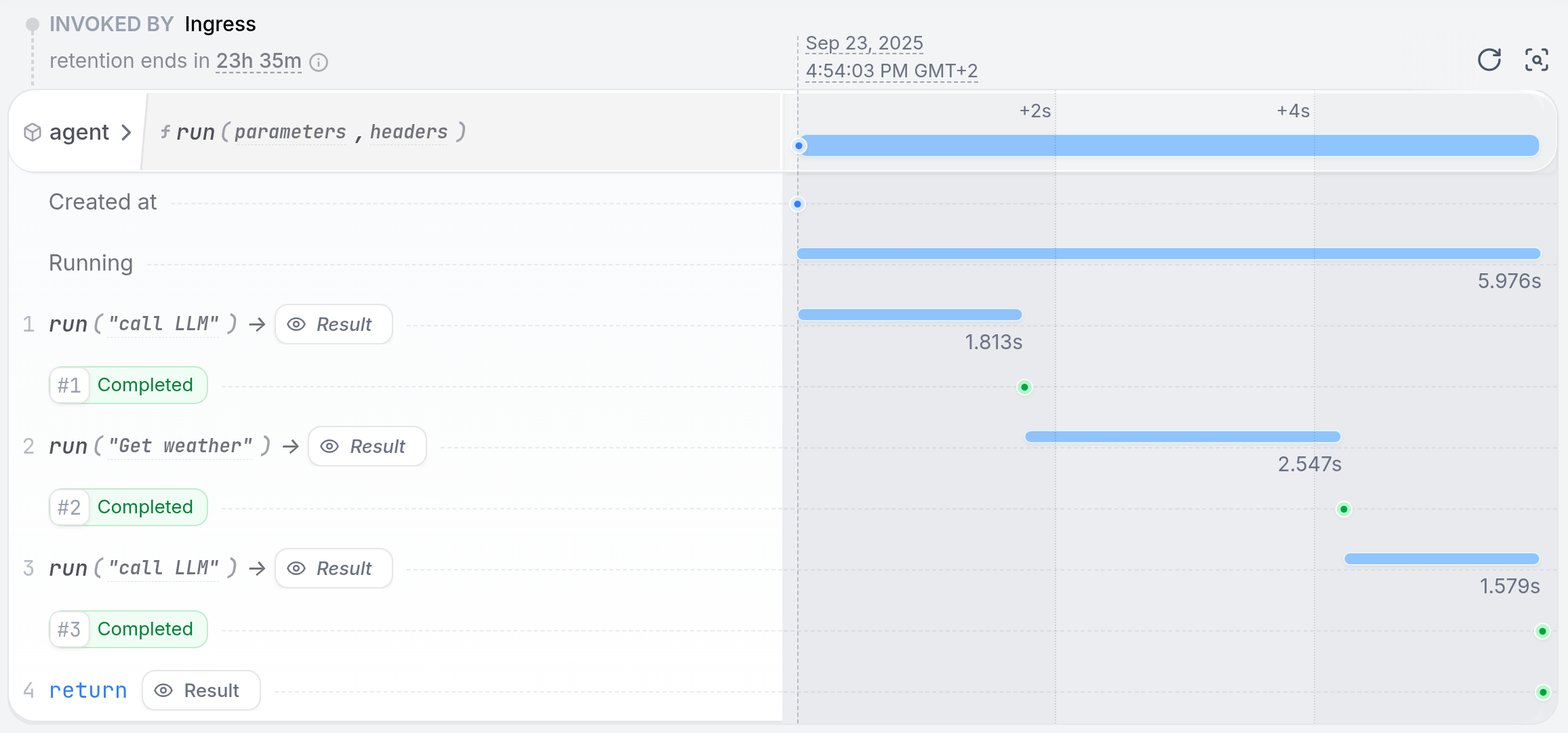
The Invocations tab of the Restate UI shows us how Restate captured each LLM call and tool step in a journal:
See how a failing tool call is retried
Ask about the weather in Denver:
curl localhost:8080/agent/run --json '"What is the weather in Denver?"'
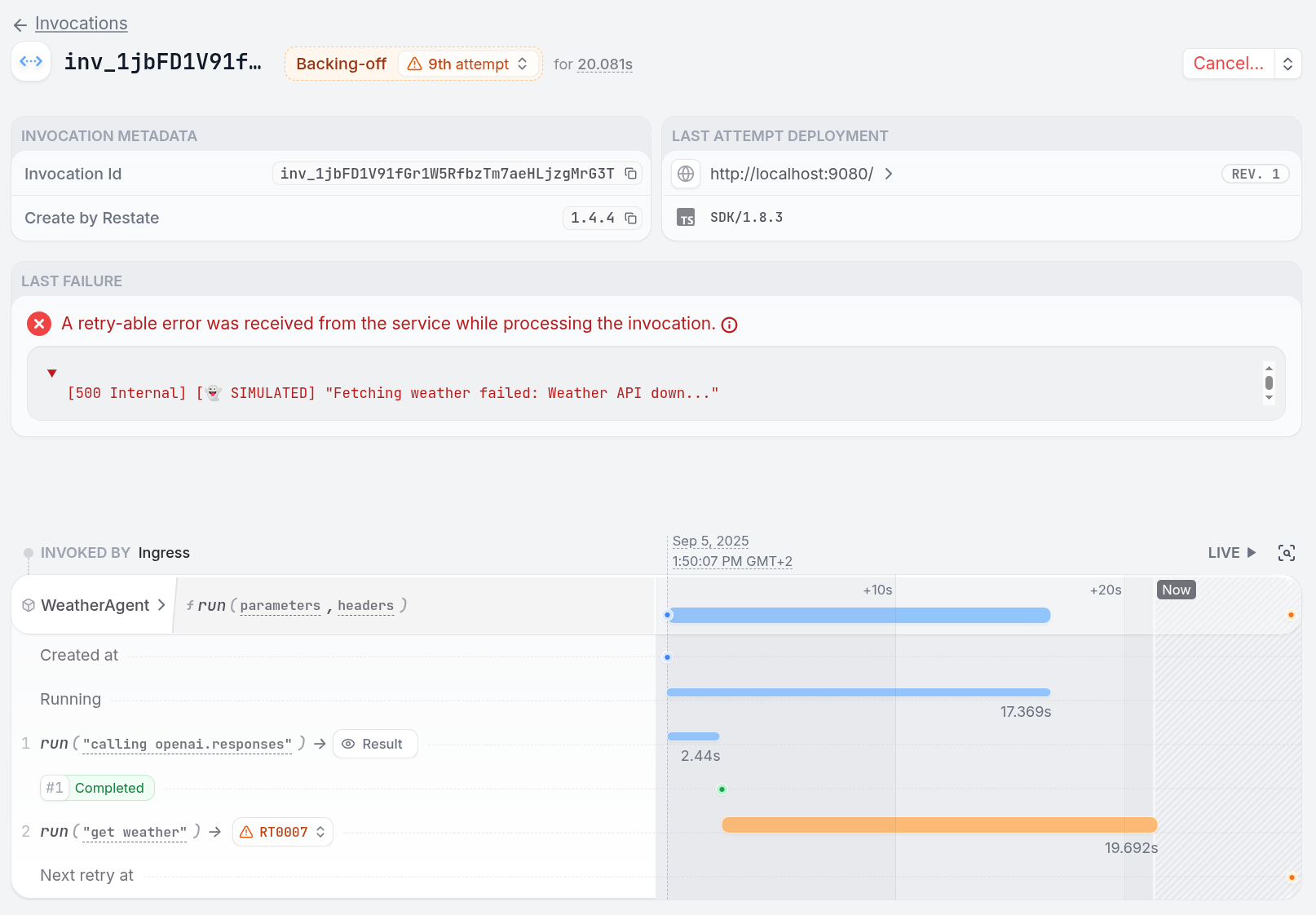
You can see in the service logs and in the Restate UI how each LLM call and tool step gets durably executed.
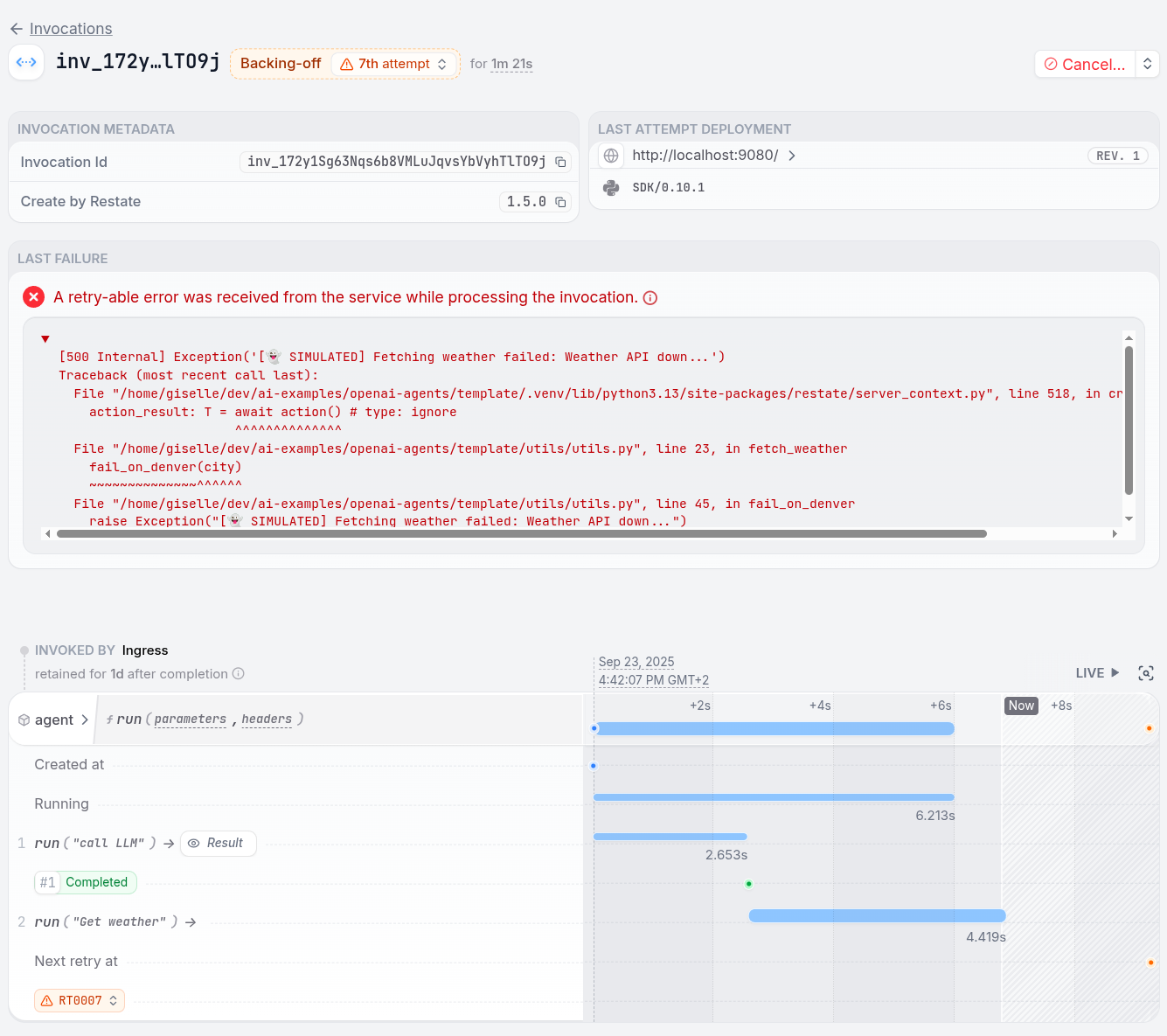
We can see how the weather tool is currently stuck, because the weather API is down.
This was a mimicked failure. To fix the problem, remove the line failOnDenver from the fetchWeather function in the utils.ts file:
export OPENAI_API_KEY=your_openai_api_key_hereuv run .
The weather agent is now listening on port 9080.
4
Register the agent service
Tell Restate where the service is running (http://localhost:9080), so Restate can discover and register the services and handlers behind this endpoint.
You can do this via the UI (http://localhost:9070) or via:
❯ SERVICES THAT WILL BE ADDED:- AgentType: ServiceHANDLER INPUT OUTPUTrun value of content-type 'application/json' value of content-type 'application/json'✔ Are you sure you want to apply those changes? · yes✅ DEPLOYMENT:SERVICE REVAgent 1
If you run Restate with Docker, register http://host.docker.internal:9080 instead of http://localhost:9080.
Restate Cloud
When using Restate Cloud, your service must be accessible over the public internet so Restate can invoke it.
If you want to develop with a local service, you can expose it using our tunnel feature.
5
Send weather requests to the AI Agent
Invoke the agent via the Restate UI playground: go to http://localhost:9070, click on your service and then on playground.
Or invoke via curl:
curl localhost:8080/agent/run --json '{
        "message": "What is the weather in Detroit?"
    }'
Output: The weather in Detroit is currently 17°C with misty conditions.
6
Congratulations, you just ran a Durable AI Agent!
The agent you just invoked uses Durable Execution to make agents resilient to failures. Restate persisted all LLM calls and tool execution steps, so if anything fails, the agent can resume exactly where it left off.We did this by using Restate’s DurableRunner to persist LLM responses, and by using Restate Context actions (e.g. restate_context().run_typed) to make the tool executions resilient:
@durable_function_toolasync def get_weather(req: WeatherRequest) -> WeatherResponse: """Get the current weather for a given city.""" # Do durable steps using the Restate context return await restate_context().run_typed( "Get weather", fetch_weather, city=req.city )weather_agent = Agent( name="WeatherAgent", instructions="You are a helpful agent that provides weather updates.", tools=[get_weather],)agent_service = restate.Service("agent")@agent_service.handler()async def run(_ctx: restate.Context, req: WeatherPrompt) -> str: # Runner that persists the agent execution for recoverability result = await DurableRunner.run(weather_agent, req.message) return result.final_output
The Invocations tab of the Restate UI shows us how Restate captured each LLM call and tool step in a journal:
See how a failing tool call is retried
Ask about the weather in Denver:
curl localhost:8080/agent/run --json '{
        "message": "What is the weather in Denvewr?"
    }'
You can see in the Restate UI how each LLM call and tool step gets durably executed.
We can see how the weather tool is currently stuck, because the weather API is down.
This was a mimicked failure. To fix the problem, remove the line fail_on_denver from the fetch_weather function in the utils.py file:


 Select your AI SDK:
 TypeScript + Vercel AI
 Python + OpenAI
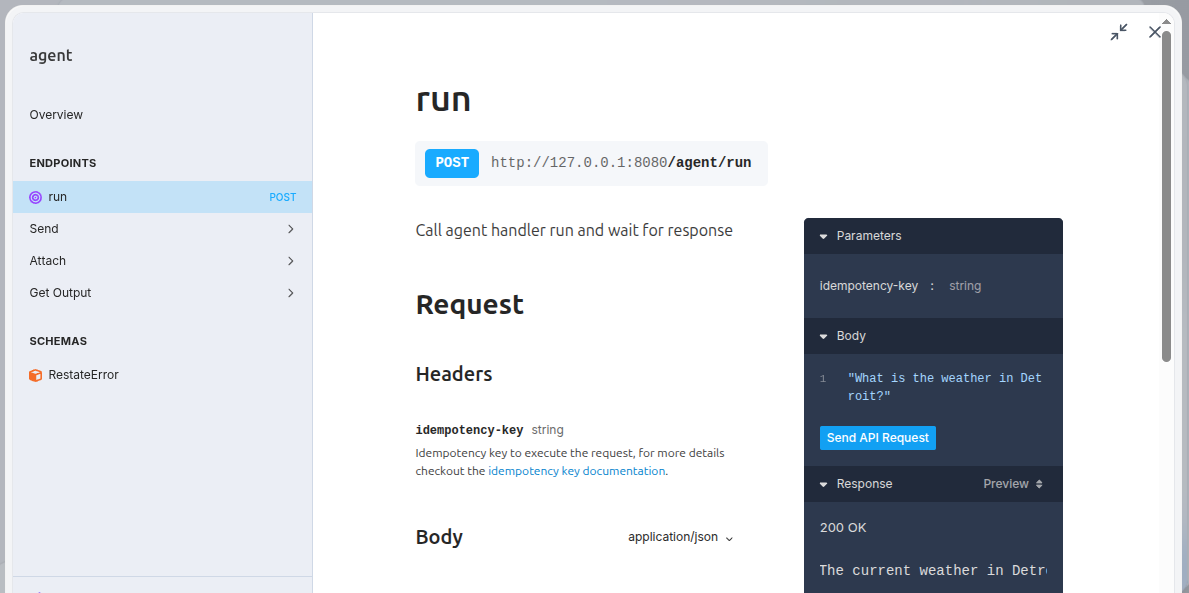 Or invoke via Output: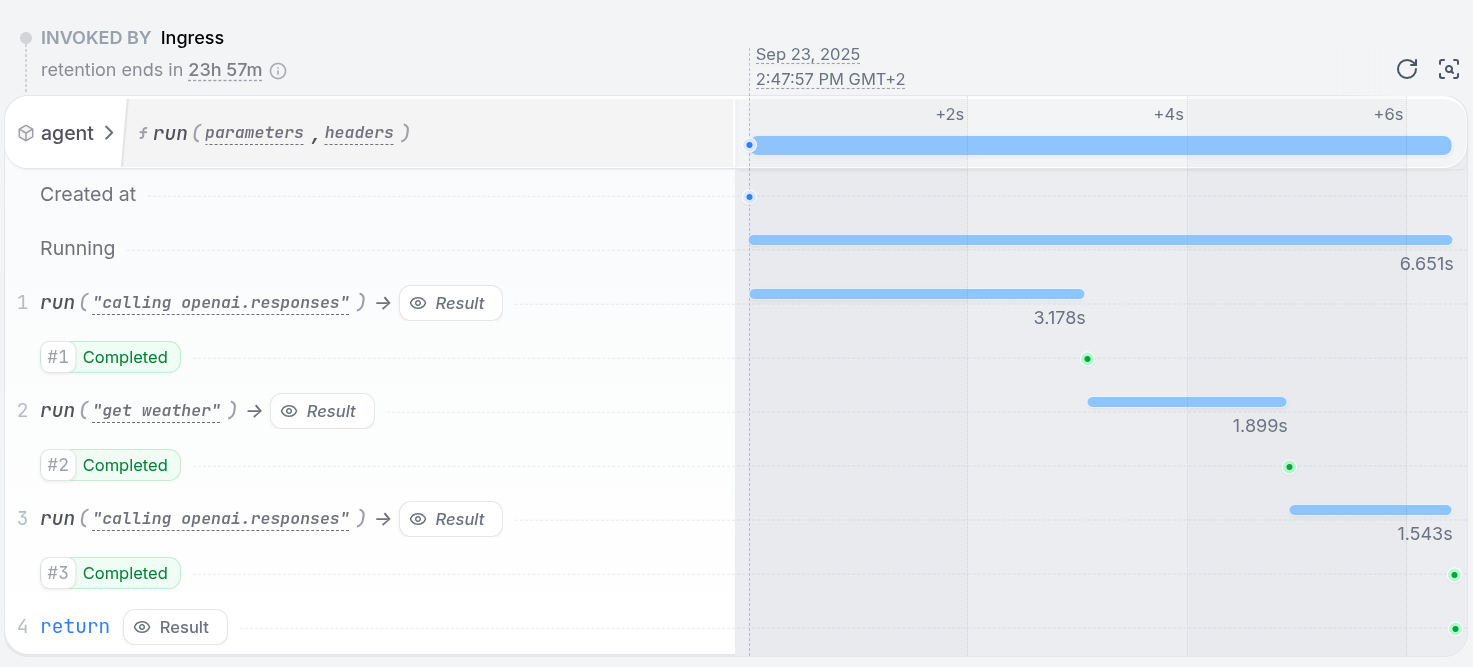
 This was a mimicked failure. To fix the problem, remove the line Once you restart the service, the agent resumes at the weather tool call and successfully completes the request.